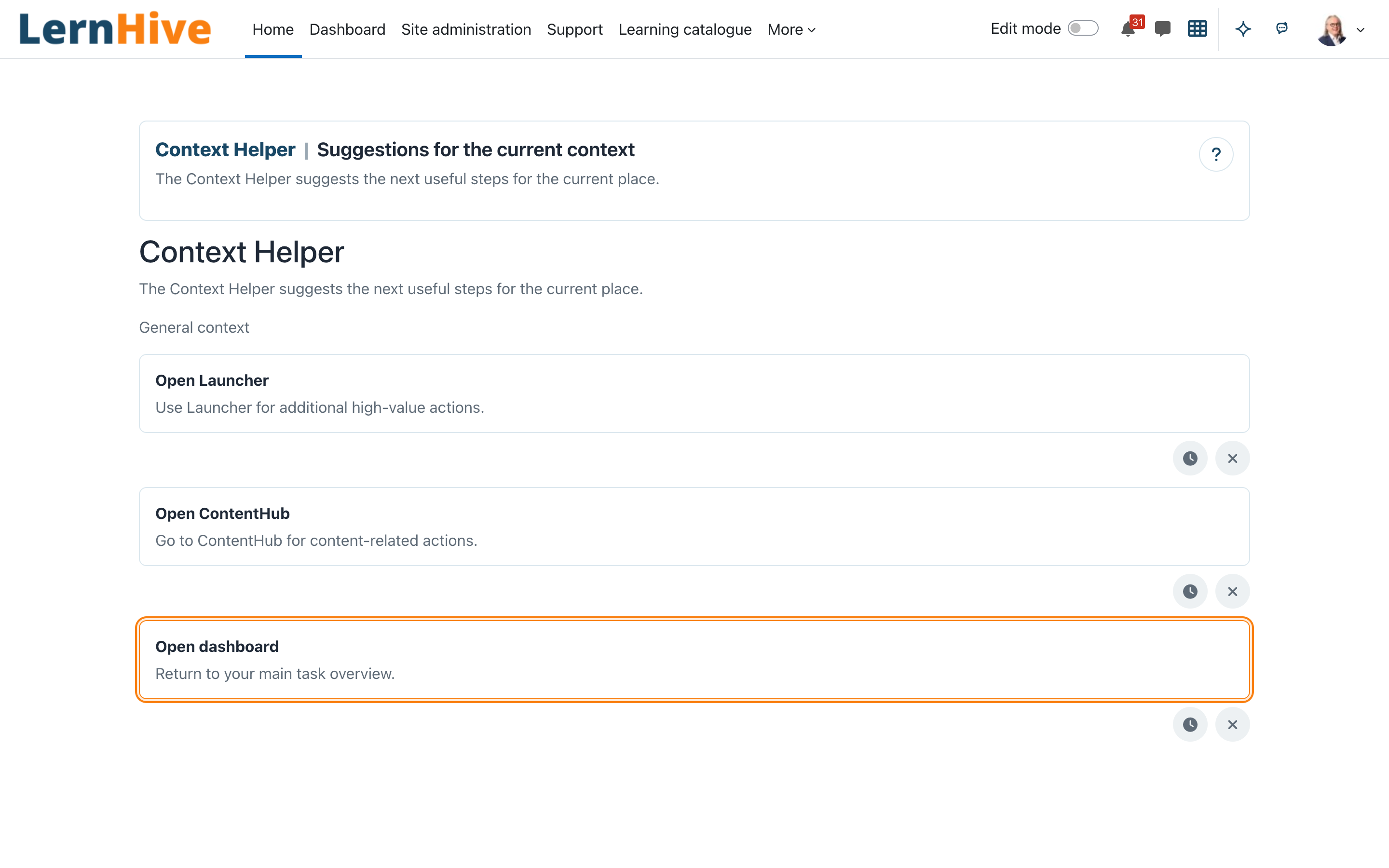
Page layout
The standalone page uses a readable-width shared shell. Its Zone-A identity is localized as Context Helper with a short description of the current-context suggestions.
What this plugin does
Context Helper answers one question in the current place: "What should I do next?" It shows up to three relevant next actions — each with a label, a one-line reason, and a direct link — instead of long option lists. Suggestions are filtered by your permissions, so dead ends are hidden rather than greyed out.
Who this is for
| Role | What they experience |
|---|---|
| Learner | Next-step suggestions where one exists; otherwise the note There is no suggested next step for this page. |
| Trainer | Teaching suggestions in a course context: Course settings, Manage participants, Open ContentHub |
Every logged-in user may use the helper — the View the LernHive Context Helper capability is granted to the authenticated-user archetype by default. Administrators can toggle sources and configure the maximum suggestion count.
Core concepts
Suggestion
One recommended next action: a label (e.g. Course settings), a short "why now" reason (e.g. "Update key course settings from here."), and one target link. The helper suggests next steps only — never general navigation such as Dashboard or Home, and never a link to the page you are on. At most three suggestions are shown, ordered by a stable priority: must-do now → continue current work → useful next step.
Detected context
The helper classifies the current place into one of five contexts, shown under Detected context:
| Context | Label | Typical suggestions |
|---|---|---|
| Course | Course context | Teachers: Course settings, Manage participants, Open ContentHub · Learners: none (empty state) |
| Community | Community context | Continue Snack (with a draft), Open community updates, Create snack (when allowed), Open Explore |
| Snack | Snack context | Continue Snack (with a draft), Open Explore, Open ContentHub |
| ContentHub | ContentHub context | Continue Snack (with a draft), otherwise none (empty state) |
| Fallback | General context | none (empty state) |
The Community context is recognised on LernHive Discovery pages. The Snack context is recognised on the Snack step of the ContentHub course wizard, where Create snack leads. The ContentHub context is the ContentHub start page. When Discovery is not installed, its suggestions are simply never offered.
Continue Snack leads to the checklist of the Snack draft you edited last: a Snack that is not published yet and that you may edit. With several drafts, the newest one is offered; there is no list of all drafts. The suggestion does not appear on the draft's own pages.
Capability-safe filtering
Before a suggestion is offered, the helper checks Moodle capabilities and whether the target plugin is installed. Unavailable actions are hidden — a learner never sees Course settings, and nobody sees links into missing plugins.
Journeys by role
Learner: check your suggested next steps
- Open the Context Helper page (
/local/lernhive_contexthelper/index.php). - The panel Context Helper explains itself — "The Context Helper suggests the next useful steps for the current place." — and shows the Detected context.
- Review the up to three suggestions; each has a reason line.
- Click a suggestion to jump straight to the target — the helper hands off, it never opens a blocking dialog.
- If there is no real next step, the panel says There is no suggested next step for this page. Learners in a course and pages outside course, community and snack contexts currently always show this note.
Trainer: read teaching suggestions in a course context
- In a course context, the helper's teacher pool applies: Course settings ("Update key course settings from here."), Manage participants ("Review enrolments and participant access."), and Open ContentHub ("Go to ContentHub for content-related actions.").
- Pick one action and continue in the owning LernHive flow — the helper never duplicates the workflow itself.
- The helper also appears below the content of ordinary Moodle pages, under every theme.
Settings that matter
The maximum suggestion count defaults to three and can be configured from one to ten. Built-in sources can be toggled in the plugin's admin settings. Access is controlled by the View the LernHive Context Helper capability.
Limitations
- The panel appears below the main content of ordinary pages and on the dedicated page
/local/lernhive_contexthelper/index.php; never in popups, secure (quiz/SEB), embedded, print, redirect, maintenance or login pages, and not in sidebars or action areas. - Suggestions are recalculated per page load, not in real time.
- Providers may supply explainable scores for ordering; there is no machine-learning ranking or personalisation.
- External plugins may register suggestion providers through the developer API.
- Community and Snack contexts depend on LernHive Discovery pages being installed.
Troubleshooting
The helper shows "There is no suggested next step for this page." → Expected when the context has no next step (learners in a course, the General context) or every candidate action was filtered out by capability, missing-plugin or same-page checks. Nothing is broken; the helper no longer fills up with navigation links (decision P20, 2026-09-28).
A suggestion the user expects is missing. → Suggestions are capability-safe: if the user lacks the permission or the target plugin is not installed, the entry is hidden by design.
The page is not accessible. → It requires the View the LernHive Context Helper capability (authenticated users by default); guests are excluded.
Screenshots
The following screenshots show the current LernHive demo interface: