Building block · local_lernhive_flavour
One install — two product personalities.
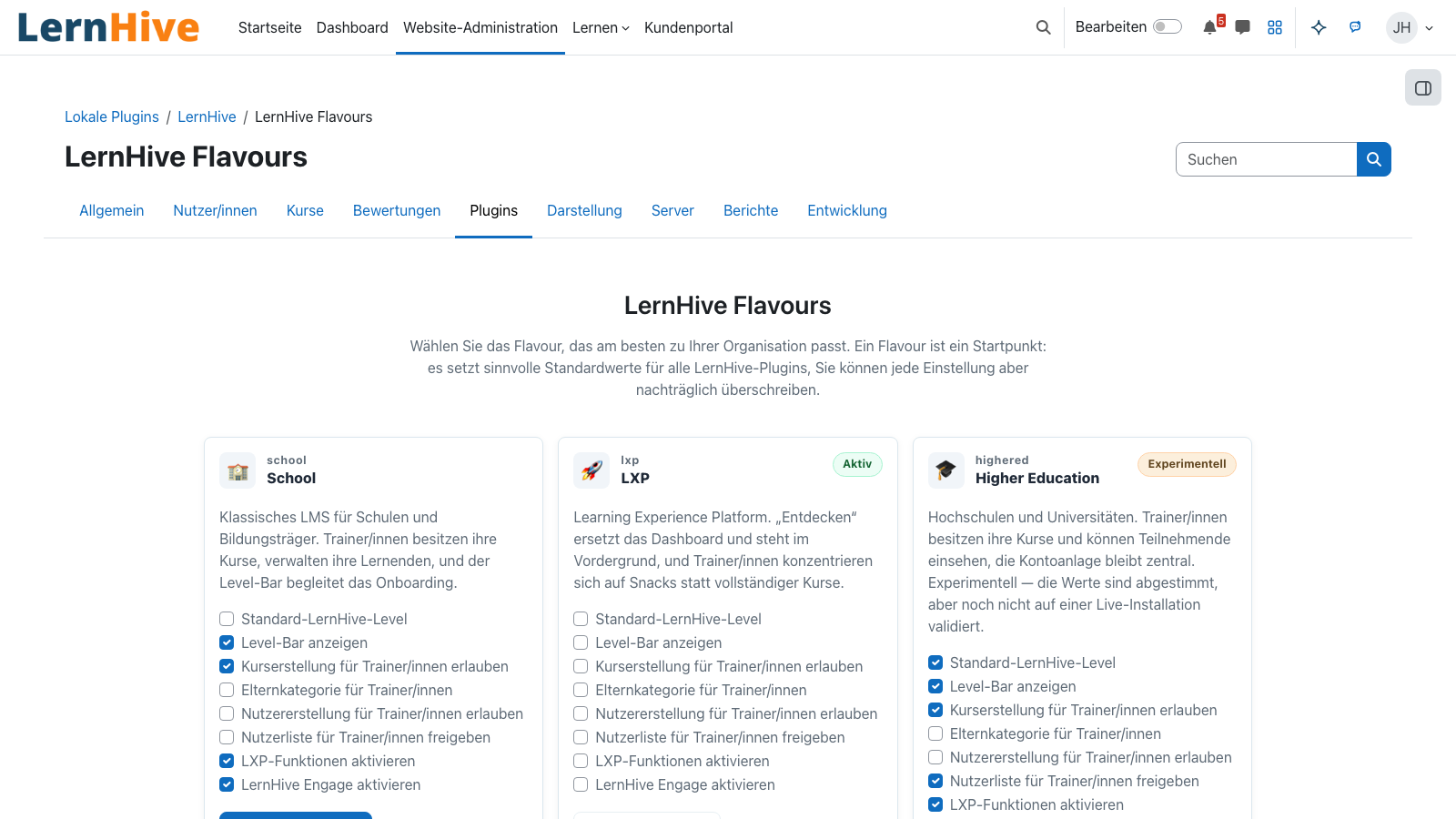
School and LXP flavours as soft starting profiles. Each flavour ships sensible defaults — every individual choice stays editable.
Overview
Two ways to set up LernHive.
Flavours set the starting point: a School focus with classic courses, enrolments and grades — or an LXP focus with an Explore feed, Follow, skills and open discovery. Each flavour activates only what's actually needed in that context.
Core features
What flavours do for you.
Two default profiles
School or LXP flavour as a soft starting point — all feature levels are pre-set but remain overridable.
Feature registry
A central table maps every feature to one of the five maturity levels: Explorer, Creator, Pro, Expert and Master. ADR-01.
Config history
Every change is logged — with a diff to the previous state and a marker if it diverges from the flavour.
Additional flavours planned
Higher Education, Corporate Academy and Association / Membership as their own profiles in later releases.
Flavour preview
Before applying, a preview shows which features and blocks will activate.
Flavour migration
Switching profiles later — manual sign-off per feature, no auto migration.
How it works
How flavour logic works.
-
First setup
On first login the admin picks a flavour — all features receive its default level.
-
Preview & confirm
Before saving, the wizard lists every change — opt-out is possible at any time.
-
Overrides
Single features can be tuned up or down later — history-backed.
-
Upgrade path
New features in a release get their flavour default without losing existing overrides.
School flavour
Focused on courses, groups, grading, completion certificates. Explore, Follow and public visibility are off by default.
LXP flavour
Focused on discovery, skill building, Follow and open content. Classic grading moves to the background.
Technical details
At a glance.
FAQ
Common questions.
Can I switch flavours later?
Yes, but the switch runs feature-by-feature with a preview and manual confirmation — nothing is overwritten without opt-in.
What happens to my overrides on an update?
Overrides stay. Only new features in a release adopt the flavour default.
Is there a blank flavour?
Yes — all features on Explorer level. Mainly for demo instances and consulting sessions.
Often combined with
LernHive Configuration
Configuration history: stores Flavour overrides with change history and a customer-visible config summary.
View detailsLernHive Onboarding
Guided user tours and trainer learning paths. Level-1 pack live, levels 2–5 to follow.
View detailsLernHive Platform Core
Foundation: Level system, feature registry and shared UI classes for every building block.
View detailsSee flavours in action.
Switch between School and LXP flavours in the demo tenant and experience the difference first-hand.