Building block · local_lernhive
Everything that matters, one click.
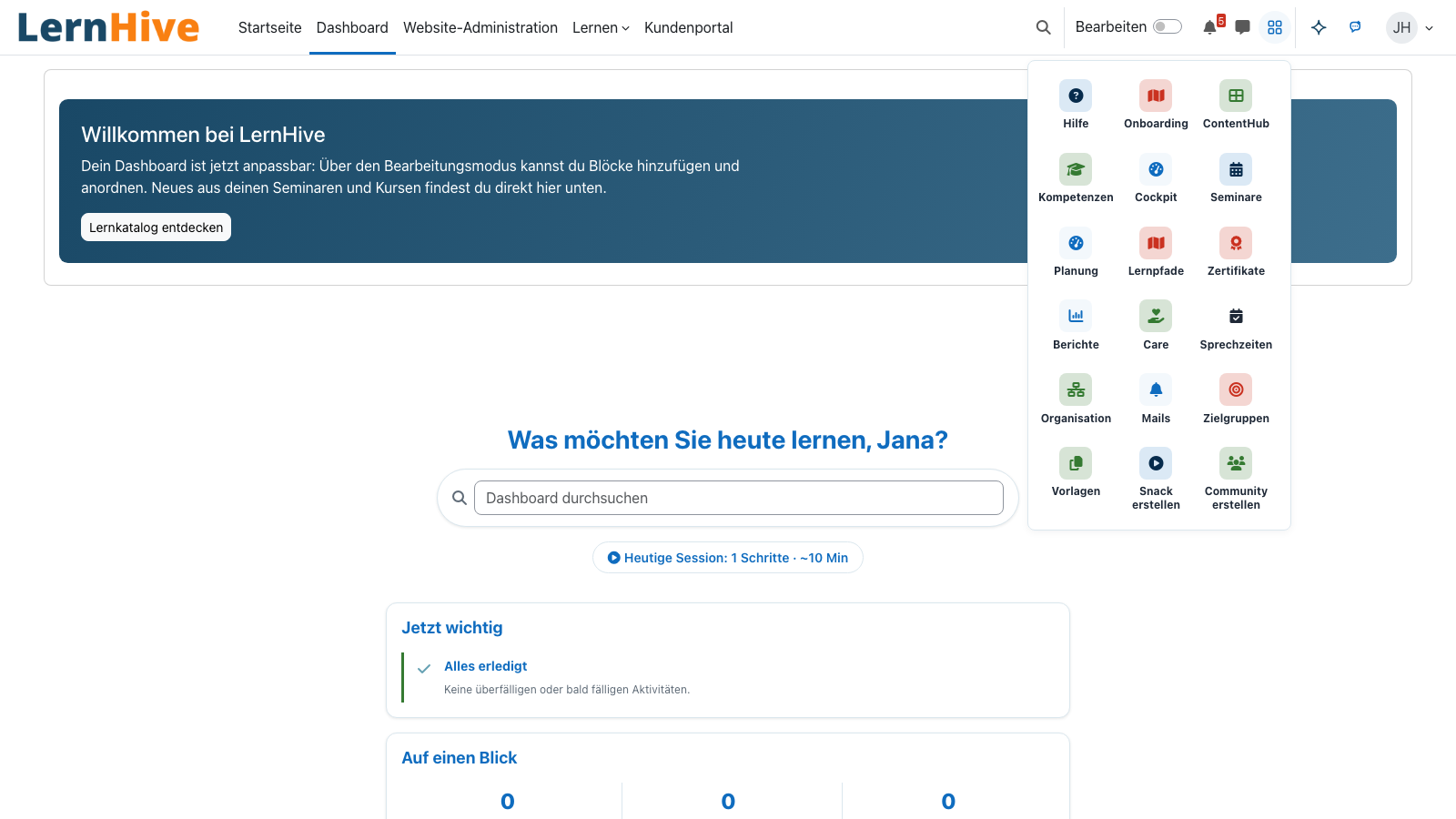
App grid next to the user menu: the areas and actions you may use.
Overview
One entry point for every area.
The launcher is LernHive's app grid. It shows each person the areas and actions their permissions allow — learners see their learning areas, trainers and administrators also reports, audiences, organisation and "Create course".
Core features
What the launcher does.
Next to the user menu
An app icon in the navbar opens the grid — under Boost and Boost Union, without a theme of its own.
Filtered by permission
Every area checks its building block's permission. People who may not use an area do not see its tile.
Operator areas
Reports, audiences, organisation, templates, mails, cockpit and help are reached through the launcher; learning areas also appear in the "Learn" menu.
Create in one click
"Create course" and — in the LXP flavour — snack and community sit right in the grid when the person may create them.
Overview page
A page of its own lists every available entry with a description.
Styleable
Base styling from local_lernhive; a Boost Union child theme can adjust colours and tiles.
How it works
How to get there.
-
Open the grid
Click the app icon next to the user menu.
-
Choose an area
Click a tile — the launcher opens the area or the creation page.
-
Close
Escape or a click outside closes the grid; focus returns to the icon.
Technical details
At a glance.
FAQ
Common questions.
Do I need a theme of its own?
No. The launcher comes from local_lernhive and appears under Boost and Boost Union by itself. A child theme can style it.
Who sees which entries?
Everyone sees only the areas and actions their permissions allow. If a building block is not installed, its tile is not shown either.
Can I use it with the keyboard?
Yes. The grid is a disclosure list of links; Tab and Enter open and choose, Escape closes.
Often combined with
LernHive ContentHub
Unified entry screen for content creation: Copy, Template, Library, AI. Pure orchestration.
View detailsLernHive Context Helper
Context-sensitive next-best-action hints, role- and level-aware. (verification pending — see catalogue D-row)
View detailsLernHive Platform Core
Foundation: Level system, feature registry and shared UI classes for every building block.
View detailsExperience the launcher.
In a call we show the launcher on a demo instance.